The Claude Code experience, self-hosted
2025 is when coding agents went from “cool demo” to something people actually try in real repos.
Claude Code is the one we see the most, but the category is bigger than that: Codex CLI, Gemini CLI, and others. They read your codebase, change multiple files, run commands, and iterate when things break. The interaction feels different from autocomplete or chat.
And yet, there are two parallel realities. Online, it looks inevitable. Inside many companies, it is still a non-starter because source code cannot be sent to an external model endpoint. Security policy, compliance, contracts. If the model lives outside the perimeter, the tool does not matter.
The constraint isn’t the agent. It’s the model.
We put together a setup that runs Claude Code against a self-hosted model. The same approach works for other tools in this category. This post covers why we chose the model we did, how the pieces connect, and what we observed.
Choosing a model for agentic coding
Not every capable model works well as a coding agent. Agentic coding requires a specific combination: the model needs to handle code generation, but it also needs to use tools reliably, maintain coherence across long interactions, and recover when something goes wrong. Models optimized for single-turn code completion often struggle when asked to operate as agents.
DeepSeek V3.2 is currently one of the strongest open-weights options for this use case. Their technical report describes training specifically for agentic tasks, with a synthesis pipeline that generated prompts across code agents, search agents, and general tool-use scenarios. The results show up in benchmarks designed to measure this kind of work:
| Benchmark | DeepSeek V3.2 | GLM-4.7 | MiniMax-M2.1 | Claude Sonnet 4.5 | Gemini 3 Pro | Claude Opus 4.5 | GPT-5.2 |
|---|---|---|---|---|---|---|---|
| SWE-bench Verified | 73.1% | 73.8% | 74.0% | 77.2% | 78.0% | 80.9% | 80.0% |
| SWE-bench Multilingual | 70.2% | 66.7% | 72.5% | 68% | 65.0% | 77.5% | 72.0% |
| Terminal Bench 2.0 | 46.4% | 41.0% | 47.9% | 42.8% | 54.2% | 57.8% | 54.0% |
SWE-bench Verified is Python-only. SWE-bench Multilingual covers the full language range, where DeepSeek outperforms Claude Sonnet 4.5 and Gemini 3 Pro. Terminal Bench 2.0 measures end-to-end coding tasks in a terminal environment. All three benchmarks are closer to real agent work than isolated code completion tasks.
Benchmark results can be gamed, and training data contamination is a real concern. Independent evaluations help validate these numbers. SWE-rebench re-runs SWE-bench continuously on new pull requests specifically to resist contamination, and it still puts DeepSeek V3.2 at the top among open-weights models. Artificial Analysis also runs agentic-style evaluations independently and aggregates them into an agentic index. There, DeepSeek V3.2 currently ranks second among open-weights, one point behind GLM-4.7.
One practical consideration for self-hosting: DeepSeek V3.2 is a 671B mixture-of-experts model with 37B active parameters. A dense model of equivalent quality would be much larger and slower. Devstral 2, for example, is a dense 123B model that performs reasonably well on coding benchmarks. But because V3.2 only activates a fraction of its parameters per token, it runs roughly 3x faster at inference while having access to more total capacity. When you’re paying for GPU time, this difference matters.
Agents routinely stuff the context with repo files, diffs, logs, and tool output, so long context is the default. At that point, the bottleneck is less about model size and more about scaling with context. This is where attention design matters.
With full attention, every token can interact with every other token, so the attention work grows roughly quadratically with context length. Sparse attention limits which tokens interact, reducing how much work the main attention does at long context. DeepSeek V3.2 is an example of this long-context-optimized approach, which helps sessions stay responsive as the context grows. By contrast, models like GLM-4.7 and MiniMax-M2.1 stick with full attention because it’s easier to get right, but sessions get sluggish as context grows.
Concurrency is the other half of the story. What matters operationally is concurrent in-flight requests, not total users. Agent workloads are bursty, and production inference relies on KV caching for latency. That means each in-flight request carries its own cache footprint, so memory adds up fast when multiple long-context requests overlap. DeepSeek V3.2 uses MLA, which caches compressed representations instead of full keys and values. That brings per-request memory at 128k context down to about 5 GB, versus about 23 GB for GLM-4.7 and 16 GB for MiniMax-M2.1. At 100 concurrent requests, that’s 500 GB versus 2.3 TB and 1.6 TB respectively (see Appendix: KV cache sizing assumptions).
For capacity planning, start from an active-user ratio (Anthropic’s assumptions are a decent proxy: costs page). If you have few active requests or plenty of headroom, these differences matter much less.
Setup
We packaged the model as umans-coder-v0 (HuggingFace). For text requests, it has the same capabilities as DeepSeek V3.2. We’ll explain later why we did that and what our variant adds.
The architecture looks like this:
specify what this means: the/v1/messages endpoint, the /v1/messages/count_tokens endpoint for token counting, and specific headers like anthropic-beta and anthropic-version.
vLLM now has an Anthropic messages endpoint, but it doesn’t implement token counting or handle the required headers that Claude Code depends on. LiteLLM fills this gap. It receives requests in the Anthropic format from Claude Code, translates them to the format vLLM expects, and handles the headers and endpoints that vLLM doesn’t support natively.
Deployment
We published Docker images built on our vLLM fork. The primary runtime image is umansai/vllm:0.1.3.
It includes DeepGEMM for optimized inference on Hopper and Blackwell GPUs.
Quickstart in Docker (set --tensor-parallel-size to your GPU count; if you see sm_103a/ptxas errors on B200/B300, set TRITON_PTXAS_PATH; HF_TOKEN and HF_XET_HIGH_PERFORMANCE=1 are optional but speed up downloads):
docker run --gpus all --rm --ipc=host -p 8000:8000 \
  -v /data:/data \
  -e HF_HOME=/data/hf \
  -e HF_TOKEN=$HF_TOKEN \
  -e HF_XET_HIGH_PERFORMANCE=1 \
  -e TRITON_PTXAS_PATH=/usr/local/cuda/bin/ptxas \
  umansai/vllm:0.1.2 \
  uv run vllm serve umans-ai/umans-coder-v0 \
    --host 0.0.0.0 --port 8000 \
    --tensor-parallel-size 8 \
    --tokenizer-mode deepseek_v32 \
    --tool-call-parser deepseek_v32 \
    --enable-auto-tool-choice \
    --reasoning-parser deepseek_v3
If you want interactive access (debugging, log inspection, manual launches), we also publish an SSH-enabled variant, umansai/vllm:0.1.3-ssh, which starts an sshd inside the container and lets you SSH in using your public key via environment variables in your platform template (useful on providers like Prime Intellect).
On a bare-metal 8-GPU node, we run vLLM directly like this (adjust --tensor-parallel-size to your GPU count):
cd /opt/umans_vllm
export TRITON_PTXAS_PATH=/usr/local/cuda/bin/ptxas
export HF_XET_HIGH_PERFORMANCE=1
export HF_TOKEN=hf_token

uv run --no-sync vllm serve umans-ai/umans-coder-v0 \
  --host 0.0.0.0 --port 8000 \
  --tensor-parallel-size 8 \
  --tokenizer-mode deepseek_v32 \
  --tool-call-parser deepseek_v32 \
  --enable-auto-tool-choice \
  --reasoning-parser deepseek_v3 \
  --max-model-len 131072 \
  --served-model-name umans-coder-v0
We tested this on 8xH200, 8xB200, 4xB300 and 8xB300.
Connecting Claude Code
Once the model is running, you need to configure LiteLLM and point Claude Code at it.
LiteLLM configuration
litellm_settings:
  drop_params: true

model_list:
  - model_name: umans-coder-v0
    litellm_params:
      model: hosted_vllm/umans-coder-v0
      api_base: http://127.0.0.1:8000/v1
      max_tokens: 20000
      temperature: 1
      top_p: 0.95
      chat_template_kwargs:
        thinking: true
Start the proxy:
uv run litellm --config ./config.yaml --port 4000Claude Code configuration
Point Claude Code at the LiteLLM proxy:
export ANTHROPIC_BASE_URL=http://localhost:4000Claude Code can also spin up background/sub-agent calls using Haiku defaults unless you override them (model config env vars). If you don’t map those to a model you actually serve, you’ll get claude-haiku-... requests that LiteLLM can’t satisfy. The simplest fix is to pin everything to your hosted model name (match the model_name you set in LiteLLM):
export ANTHROPIC_MODEL=umans-coder-v0
export ANTHROPIC_DEFAULT_HAIKU_MODEL=umans-coder-v0
export CLAUDE_CODE_SUBAGENT_MODEL=umans-coder-v0
You can also set the same values in .claude/settings.local.json instead of environment variables (settings scopes).
Once pointed at the proxy, Claude Code sees the hosted model normally:
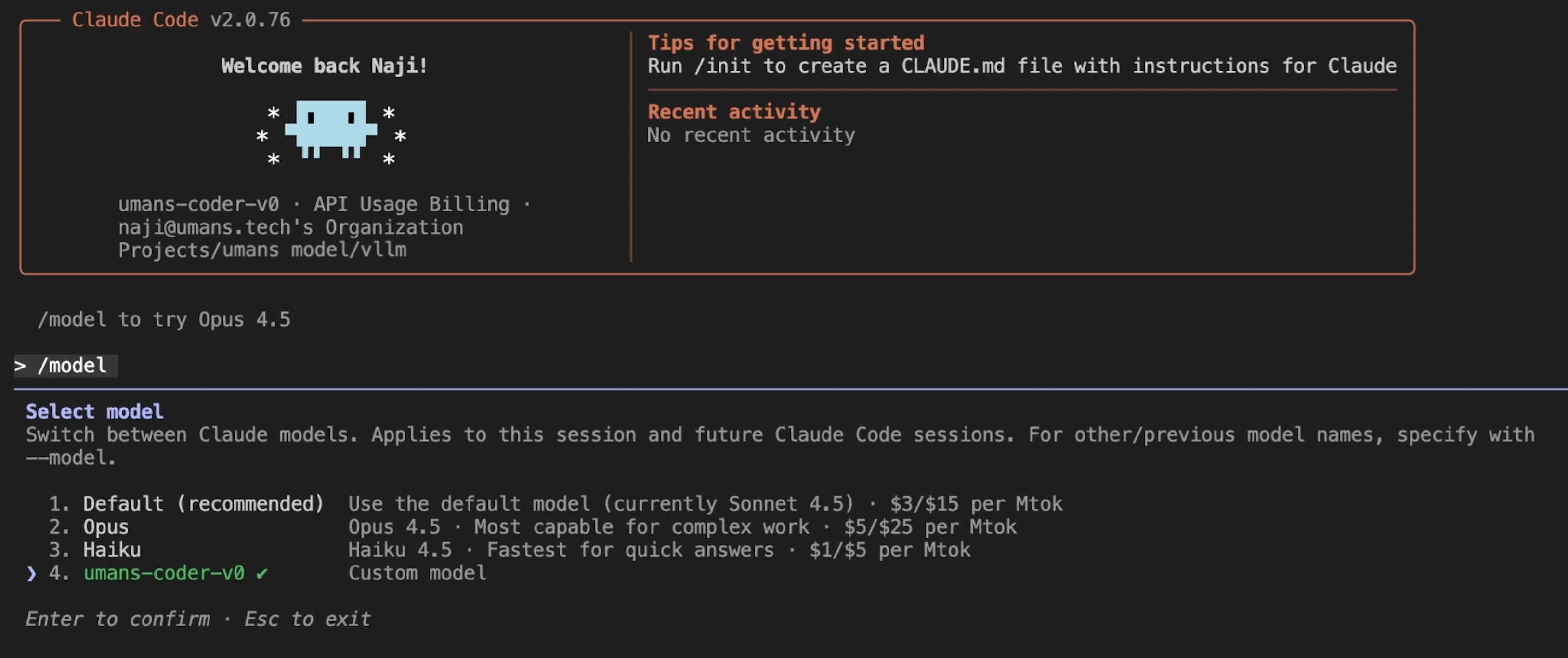 Claude Code picks up the self-hosted model through LiteLLM.
Full session example (multi-file edits, greps, tool calls):
What we observed
The workflow works. Multi-file edits, streaming responses, iterative debugging. The interface is unchanged since it’s still Claude Code.
Capabilities land where the benchmarks suggest. Refactors, test generation, bug fixes all work. The model reasons through problems and recovers from errors. For agent frameworks that simulate tool calls via user messages, DeepSeek’s report notes that non-thinking mode tends to work better. Claude Code handles both modes. In thinking mode, some edge-case request patterns can trigger a proxy retry that disables thinking for that step, but Claude Code continues without interruption.
Hosted tools caveat (WebSearch)
One gotcha: hosted Anthropic tools (like WebSearch) don’t run when Claude Code is pointed at a self-hosted model. That’s fine for data residency, but the calls fail silently and the model still receives a “successful” response, which can confuse it. In practice you’ll see the tool call in the log, but zero searches executed.
Example from the log:
 The tool call shows up, but zero searches are actually executed.
We recommend explicitly disabling those hosted tools (the Claude Code CLI supports --disallowedTools):
claude --disallowedTools "WebSearch"MCP as the alternative
We tested MCP as the alternative path: Claude Code supports MCP servers and it works cleanly with hosted models. This also doubles as a replacement for WebSearch when you still want a live search tool (at the cost of data egress).
To add Exa MCP (note: this sends data outside your perimeter), use the hosted server and expose the web_search_exa tool for real-time search and get_code_context_exa for code/documentation retrieval:
claude mcp add --transport http exa "https://mcp.exa.ai/mcp?exaApiKey=EXA_API_KEY&tools=web_search_exa,get_code_context_exa"The remaining gap
The main thing missing is vision.
Claude Code’s full workflow includes sending screenshots, mockups, and error traces. When you can show the agent what’s wrong instead of describing it, the interaction changes.
DeepSeek V3.2 is text-only. Vision models exist in the open-weights space, but they’re generally not at the same level on agentic coding tasks. Adding vision capabilities tends to come at the cost of performance on the tasks that matter for this use case.
We’re working on closing that gap. The approach is to start from a strong agentic coding base and add vision without degrading the rest. umans-coder-v0 is the foundation for that work.
More on that soon 👀.
Appendix: KV cache sizing assumptions
All estimates below are KV cache only (no weights, no activations). They assume a 128k context is 131,072 tokens.
DeepSeek V3.2:
- FlashMLA sparse backend notes an FP8 “with-scale” KV cache format of 656 bytes per token (per layer).
- Per-layer cache at 128k: 656 * 131,072 ~= 86 MB (≈82 MiB).
- DeepSeek V3.2 has 61 layers -> ~5 GB per in-flight request.
Full attention (GQA) sizing formula:
- Per-token KV bytes per layer ~= 2 * num_key_value_heads * head_dim * bytes_per_element
- 2 is for K and V.
- bytes_per_element is 1 for FP8, 2 for FP16/BF16.
GLM-4.7:
- num_key_value_heads = 8, head_dim = 128, num_hidden_layers = 92.
- Per-token KV bytes per layer (FP8): 2 * 8 * 128 = 2048 bytes -> ~256 MB per layer @ 128k.
- 256 MB * 92 ~= 23 GB per in-flight request (FP8 KV cache).
- If KV cache is FP16/BF16 instead, multiply by ~2.
MiniMax-M2.1:
- num_key_value_heads = 8, head_dim = 128, num_hidden_layers = 62.
- Per-token KV bytes per layer (FP8): 2 * 8 * 128 = 2048 bytes -> ~256 MB per layer @ 128k.
- 256 MB * 62 ~= 16 GB per in-flight request (FP8 KV cache).
- If KV cache is FP16/BF16 instead, multiply by ~2.